For clinics
Pensday
for clinics
Your patients log every pen, their side effects and their weight in Pensday. The app asks them to share their patterns with their clinician, to spot what’s normal for them.
Last updated
In the app
What your patients log.
Every pen
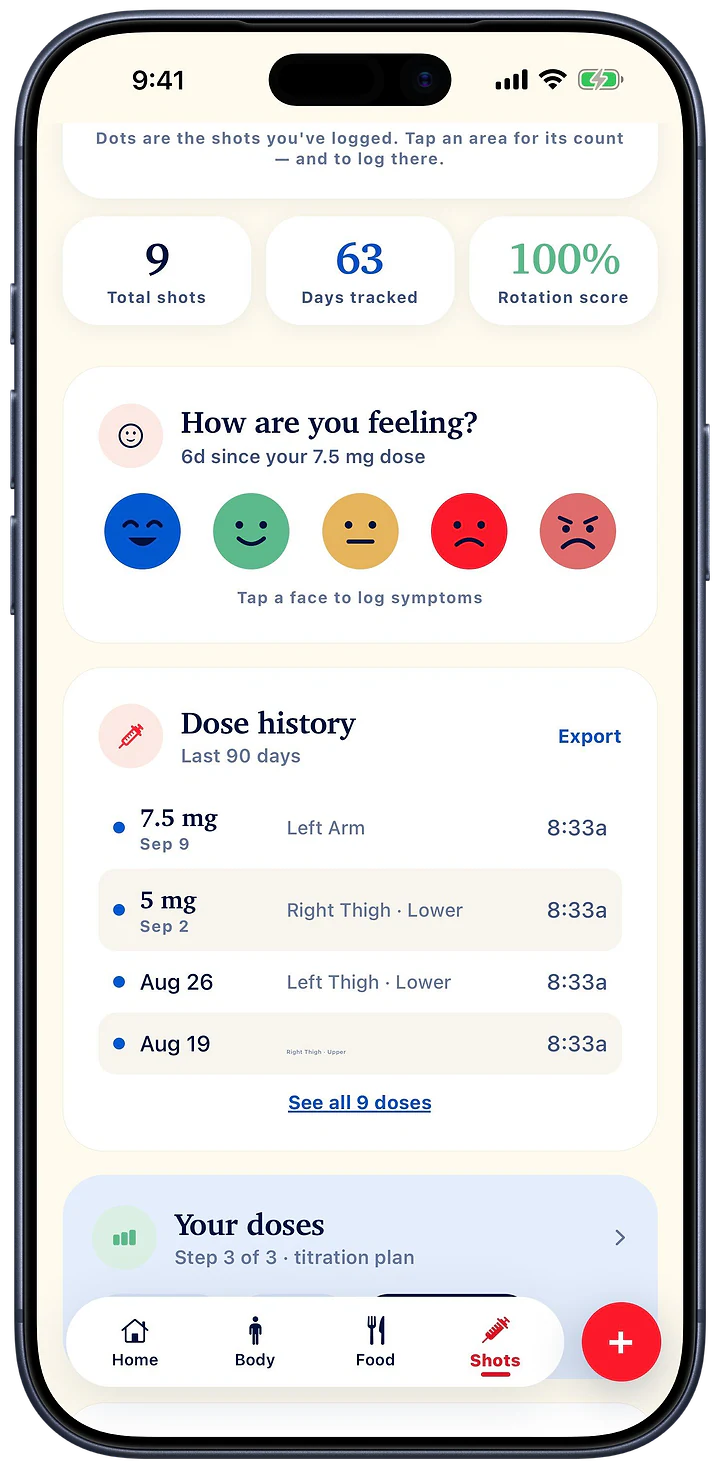
Dose, date and site
Each shot is logged with its dose, time and injection site, and how it felt.
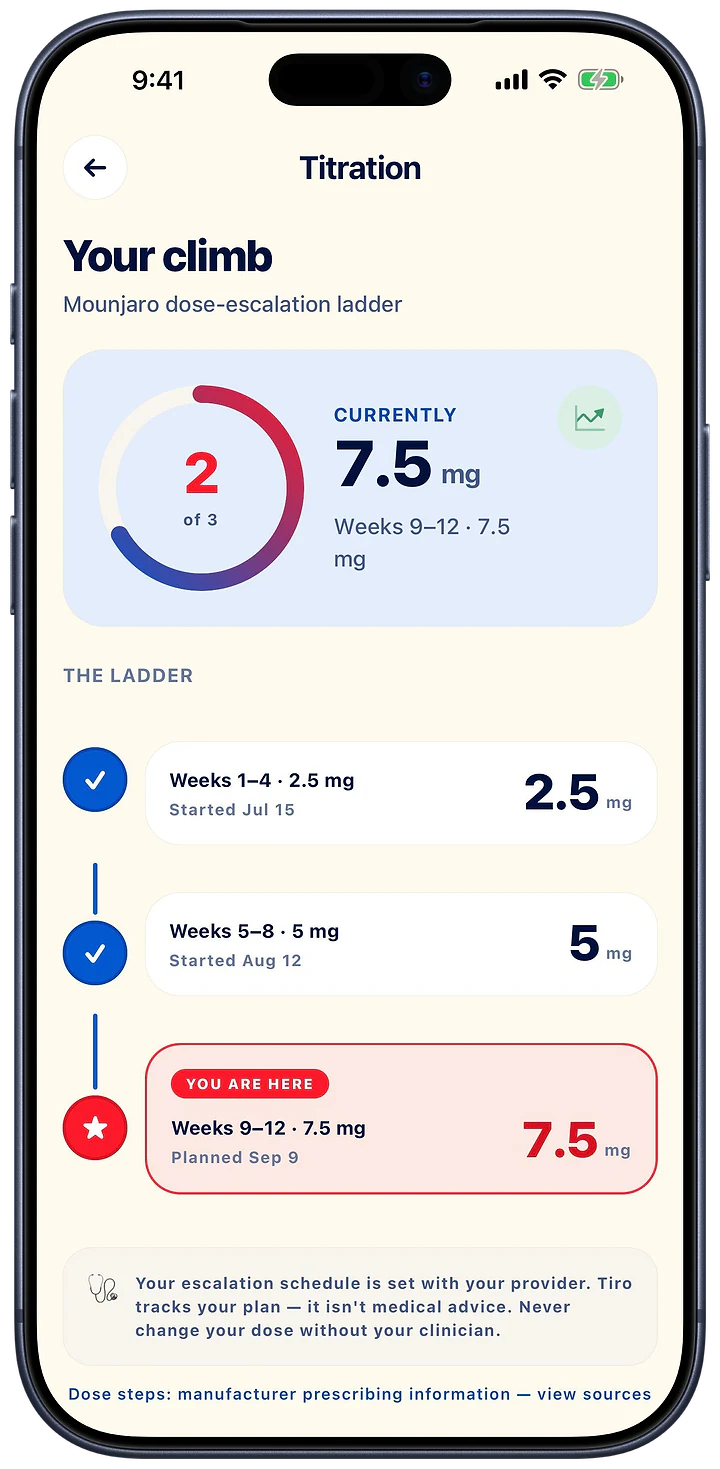
The ladder
The plan set with you
The escalation schedule is set with the patient’s provider; Pensday tracks the plan step by step.
Patterns
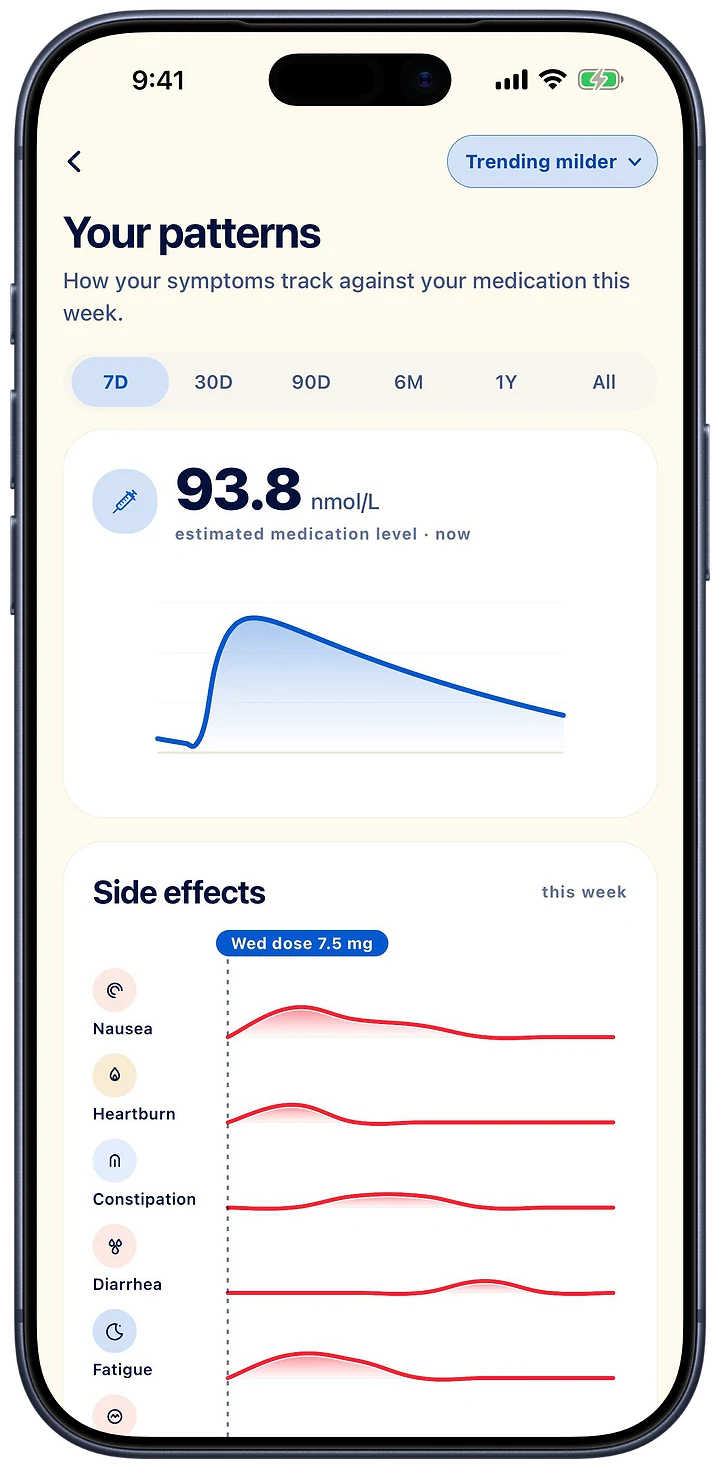
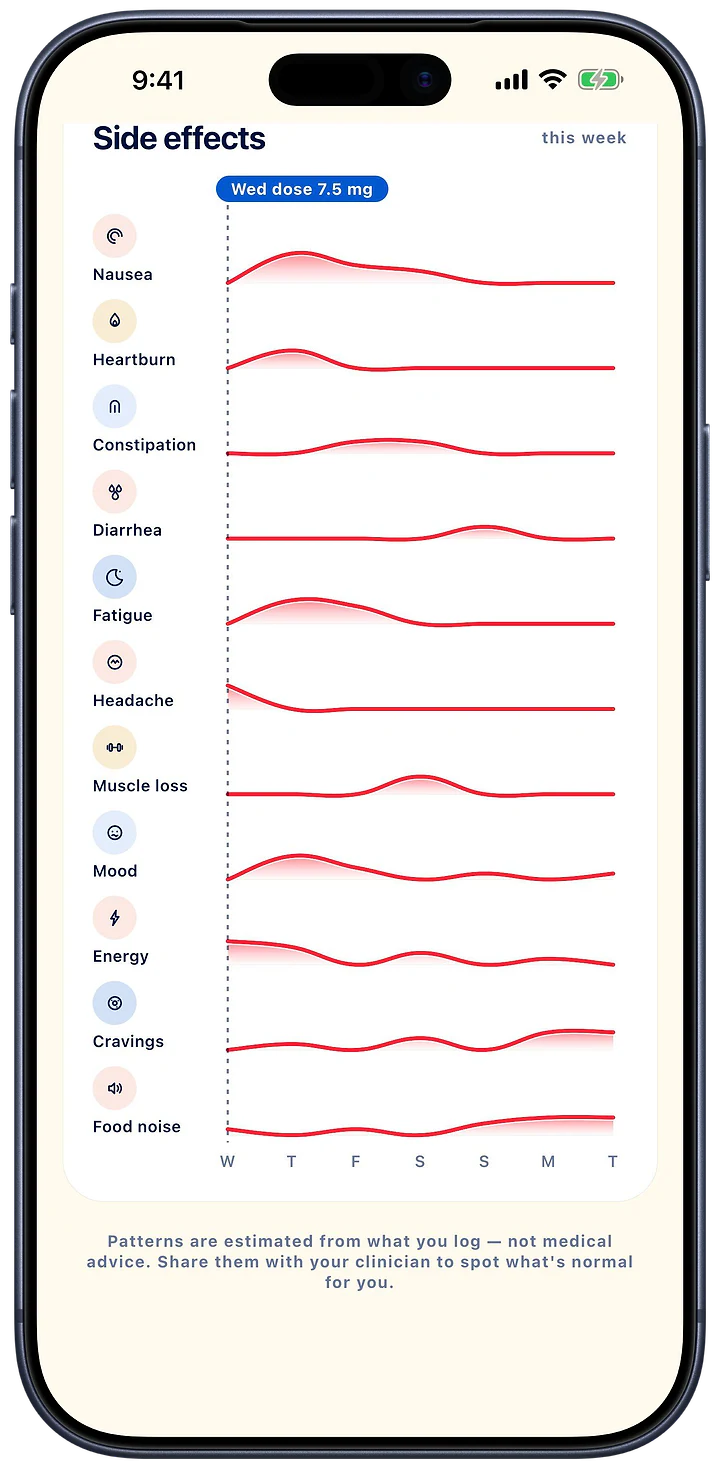
Side effects under the dose
The side effects your patient logs, under their estimated medication level (estimated from logged doses, not a measured blood level). Patients are asked to share them with their clinician.
Know who’s struggling, before their next appointment.
Your GLP‑1 patients log every dose, side effect and weigh-in in Pensday. Pensday for Clinics turns that into your team’s morning worklist: who missed a dose, whose nausea spiked after a step-up, who has gone quiet. It works with the patient’s consent and there is nothing to install.
No card, no contract, no integration. Patients consent in their own app. To register your clinic or book a walkthrough, email clinics@pensday.com.
The dropout happens in the weeks you don’t see
A GLP‑1 course is decided between appointments: the nausea after a step-up, the protein that quietly collapses, the dose that gets skipped and then the next one. By the time a patient tells you, they have usually already stopped.
- 64.8% of GLP‑1 patients without diabetes stop within twelve months. Most of them never say why; they just don’t rebook. (Rodriguez et al., JAMA Network Open 2025, n = 125,474.)
- Every 4 weeks there is a dose step, and a fresh week of nausea, fatigue and skipped protein that happens between your appointments, not in them. (Mounjaro and Wegovy titration schedules.)
For a private clinic, that is a patient who does not rebook. For the patient, it is a treatment that failed for a reason you could have fixed in a phone call.
Open the portal. Start with who needs you.
A worklist, not a database
Seven rules run across your whole clinic every time the list loads, and it opens on the patients they fired for. Every threshold is yours to set.
| Flag | When it fires |
|---|---|
| Missed | Two or more scheduled doses passed with nothing logged. |
| Severe symptom | A side effect at or above your severity threshold in the last 14 days. |
| Escalated while symptomatic | A dose increase within 7 days of a severe side effect. |
| Silent | Nothing logged for your quiet period, after having been active. |
| Rapid loss | Losing more than your threshold per week on the smoothed trend. |
| Protein low | Under their own protein target on most of the last seven days. |
| Not syncing | Their phone has stopped reaching us, so you know the record is stale. |
The record, the way you’d want it
Doses against the label window. Side effects as a grid by day and severity. Weight with the weekly rate. Nutrition totals against their protein floor. Body composition without a photo. Your notes, and a PDF of all of it.
Zero IT
Register in minutes. Invite with a code you read out in the room. The patient ticks what to share on their own phone. Nothing to integrate, nothing to install, and no data entry: the record is the one they already keep.
See the shape of a side effect
Every side effect by day and severity, laid beside the days they dosed, and the average by day-after-dose. “Worse on day two after the step-up” stops being a memory the patient half-recalls in the room and becomes a chart you can act on: hold the dose, slow the titration, or reassure with evidence.
- Thirteen symptom types, each with the patient’s own note
- Flagged the moment one crosses the threshold your clinic set
- The escalation rule catches a dose increase inside a bad week
Know where they are on the curve
An estimated medication level, computed from the doses they actually took and published pharmacokinetics for every GLP‑1 on the market. A missed dose in week two and a missed dose at maintenance are not the same event; now you can see which one it was, and when the level will be back where it should be.
It is labelled Model, carries the same disclaimer the patient reads, and links to the prescribing documents and papers it is built on. Never a blood test, never a recommendation.
Everything they log, the way a clinician reads it
One record. Every category they shared, in order.
- Doses, against the label. Every dose on the schedule they were following, measured against the manufacturer’s own window, so a late dose and a missed one look different.
- Side effects, as a shape. Thirteen symptom types by day and severity, laid beside the days they dosed, plus the average by day-after-dose.
- Weight, with the rate. The trend and the weekly rate, anchored on their last weigh-in and captioned with the weigh-ins it was measured over.
- Nutrition, as daily totals. Calories, protein, fibre, carbs and fat against their own targets: the protein floor that protects muscle, visible day by day.
- Body composition, without a photo. Every measurement a scan produced, estimated body fat, and the same 3D figure the patient sees, rebuilt from nine shape numbers, ten on a female record.
- Notes, print and the whole timeline. Your clinic’s notes against the link, a one-click PDF of the entire record, and every entry from every category in one ordered timeline.
Search by name. Sort the whole clinic by needs-attention, next dose due, weeks at the current dose, last activity, name, or when they connected. Assign patients to a clinician. Live updates the moment a patient logs.
Live in one appointment: three steps, no IT
- Register your clinic (about three minutes). Your email, an authenticator app for the second factor, and your clinic’s name. Add colleagues from the Team page: clinician, nurse or admin, each with the access their role needs.
- Invite the patient in the room (ten seconds). Create an invite from your patient list: a short code you read out, a QR they scan, or an email. Until they accept, there is nothing to see, at most a row that says Awaiting consent.
- They tick. You see. (Live from the first sync.) They open Pensday, enter the code and tick the categories they want you to have. Their record appears in your portal and updates every time they log, with no data entry on your side, ever.
What your patient sees is seven categories, nothing pre-ticked: doses and schedule, side effects, weight, daily nutrition totals (never the meals or photos), water, body scans (measurements and body composition, never the photos) and the basics they gave the app when they set it up.
Patients share because they can see what you see
Every time your clinic opens a record, takes a copy or reads a note, it is written to the access log before the data comes back, and the same list appears in the patient’s own app, named and timed. Consent that a patient can watch is consent they give. It is also the model a data-protection officer signs off in one read.
- Categories, not an all-or-nothing box: they share doses and side effects and keep nutrition private if they like
- Change or withdraw from their own phone, without asking you
- Your clinic gets the same log, filterable, as its own record of activity
Governance your DPO can sign off in one read
None of these is a policy we ask you to trust. Each is a check that runs inside the database on every request, which is why we can tell you what it does rather than what we intend.
- Two factors, enforced in the database. Every clinic function checks for a second factor before it checks your role. A stolen password reaches no patient record: not a dose, not a weight, not a symptom.
- Explicit consent, Article 9(2)(a). Seven separate boxes with plain-language examples under each, none pre-ticked, on the patient’s own phone. Widening it is something only they can do.
- An audit log the patient can read. Every look at a record, every copy taken and every note read is written before the data comes back, and shown in the patient’s app, named and timed.
- Revoke means delete. When a patient ends the link, everything mirrored to us that no other consent of theirs still covers is deleted, and your notes on that link go with it.
- No photographs, ever. Body-scan images are analysed on the phone and discarded there. What reaches you is measurements and shape numbers; the table that receives a scan has no column a photo could land in.
- Deny-by-default hosting. One Postgres database run by Supabase. A clinician account cannot read the tables holding what a patient shared; every value comes back from a function that has already written the log. DPA and sub-processor list in writing before your first patient.
Free for clinics
No card, no contract, no per-seat pricing. Unlimited patients and team members. If it stops being useful, stop, and every patient can end their own link without asking either of us.
What you get today:
- The worklist with all seven rules and your own thresholds
- Every record tab, notes, PDF export and the clinic access log
- Unlimited clinicians, nurses and admins with role-based access
- Invite codes, QR and email invites, live updates
- DPA and sub-processor list in writing before your first patient
Frequently asked questions
How long does setup take?
About three minutes for the clinic (email, an authenticator app, your clinic’s name) and about ten seconds per patient, in the room. There is no integration, no IT ticket and no import.
What does the patient have to do?
Install Pensday from the App Store, enter your invite code, and tick the categories they want you to see. That is the whole flow. For a patient who already tracks in Pensday, it is one code and seven boxes.
Do we need IT, an integration or a data-entry step?
No. The record is what the patient already logs on their own phone; it reaches you the moment they consent and updates as they log. Nothing imports from your systems and nothing has to be typed in on your side. The portal runs in any modern browser, including the one on a consulting-room laptop.
Can we see more than they ticked?
No, and there is no screen for it. If a category is not ticked, the server does not return it. The check lives in the database, not in the portal, so it holds regardless of what a client asks for. Widening consent is something the patient does in their own app, which is exactly why patients are comfortable saying yes.
Is this a medical device?
No. Pensday for Clinics displays what a patient chose to log and chose to share. It does not diagnose, calculate a dose, or recommend one. The single modelled number on the page, the estimated medication level, is labelled “Model”, carries the same disclaimer the patient reads in their own app, and links to the prescribing information and pharmacokinetic papers it is computed from. Every clinical decision stays with you.
Where is the data held, and who else touches it?
In one Postgres database run by Supabase, our infrastructure provider for the whole product. Access is deny-by-default: a clinician account cannot read the tables holding what your patient shared, and every value you see comes back from a function that has already written the access log. We put the hosting region, the sub-processor list and the data-processing agreement in writing before your first patient is invited.
What happens when a patient revokes?
Your access ends immediately. Everything mirrored to us that no other consent of theirs still covers is deleted, and the notes your clinic wrote against that link are deleted with it. Your access log survives, because it is the patient’s own record of what was looked at while the link was open.
What does it cost?
Nothing. Pensday for Clinics is free for clinics: no card, no contract, no per-seat pricing, unlimited patients and team members. Stop whenever you like by simply not using it; every patient can end their own link without asking either of us.
Talk to us
Three minutes to set up, ten seconds per patient, and a worklist waiting for you the next morning. Email clinics@pensday.com to register your clinic, or to book a walkthrough and we’ll set it up with you.